TQMa8MPxS - YOCTO Linux BSP documentation
Audio
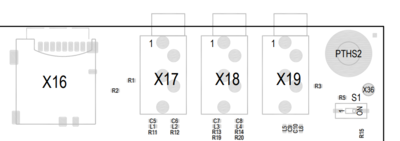
Audio Connector Overview
| Connector | Function |
|---|---|
| X17 | Line In |
| X18 | Headphone |
| X19 | Microphone |
Audio Connector Location
Play Audio on MB-SMARC-2
A simple test sound can be played with the command-line tool speaker-test.
Headphones or active speakers have to be connected to X18 on MB-SMARC-2.
speaker-test --channels 2 --test wav -D sysdefault:CARD=tqmtlv320aic32
Or the following command to use the default audiocard:
speaker-test --channels 2 --test wav
You can also play your own audio files using aplay
aplay <file>
e.g.
aplay test.wav
Please note that the default image does not include audio test files.
Record Audio on MB-SMARC-2
To record audio from the Line-In interface, use arecord:
arecord -f cd test.wav
The audio settings can be configured using
amixer or alsamixer