Starterkit Quicksteps
The Starterkit STKLS10xxA consisting of the TQMLS10xxA module and MBLS10xxA mainboard is intended as evaluation platform for the TQMLS10xxA. To bring up the board a comprehensive set of accessories is supplied with the kit. The STKLS10xxA is delivered preconfigured to boot the latest released Linux BSP revision at the time of delivery, so only the Host Computer has to be set up properly to bring the STKLS10xxA up. This page guides through the first steps with the STKLS10xxA Starterkit.
Setup Host Computer
Serial Driver
The TQMLS10xxA debug UART is connected via a FTDI USB-to-Serial converter to X38 (micro-USB) on the MBLS10xxA. A micro-USB/USB-A cable for the connection to the host PC is part of the STKLS10xxA accessory set. Depending on the host operating system, the USB-to-serial converter driver may need to be installed.
Linux
The FTDI driver is maintained in the Linux mainline kernel, the configuration options below must be activated in the Linux kernel configuration to operate the USB-to-Serial converter
- CONFIG_USB_SERIAL
- CONFIG_USB_SERIAL_FTDI_SIO
Windows
The driver can be downloaded from the FTDI website:
https://ftdichip.com/drivers/vcp-drivers/
An installation guide can be found at the following link:
https://ftdichip.com/document/installation-guides/
Terminal Emulator
Linux
Minicom
Minicom is a command line based serial terminal for serial communication with hardware like our starterkits.
Install Minicom using APT(Debian/Ubuntu)
$ sudo apt install minicom
In order for the terminal to work properly with full rights you need to add your user to the dialout group:
$ sudo usermod -a -G dialout $USER
Connect Starterkit to Host
To determine the serial device name under linux you can use dmesg. Just run the command below and then plug in the starter kit to see the new detected interface names:
$ dmesg -w
Once the interface name is clear you can abort dmesg with ctrl + c.
Now you can start minicom via the command line interface:
$ minicom -D /dev/ttySx
Configure minicom
The serial configuration should be correct by default. However, hardware flow control must be disabled for some starter kits, otherwise the communication works only in one direction.
- Press CTRL + A, then press O to open the configuration menu
- Go to Serial port setup
- Press F to change Hardware Flow Control to No
- Hit Return key
- Select Save setup as dfl to save this configuration as default
- Press ESC to exit the menu
Now you should be able to communicate with the starter kit

Windows
TeraTerm
TeraTerm is an open source terminal emulator for windows. It can be downloaded here.
Configure TeraTerm
- Download and install TeraTerm
- Start TeraTerm and open the Serial Port Settings
- Select your serial port and configure it with the values defined in the chapter Serial Configuration
- After passing the values click on the button New Setting
Now TeraTerm should be ready for use with our starter kits.

Host PC Serial Port Configuration
The serial port which connects the STKLS10xxA to the Host PC must be configured as follows:
| Baud rate: | 115200 |
|---|---|
| Data bits: | 8 |
| Parity: | none |
| Stop bits: | 1 |
| Handshake: | XON/XOFF |
Connecting the Starterkit to the Development Host
Please follow the quick start guide delivered with the kit, or open it from the following link: Quick start guide
Linux
BSP Login Credentials
As soon as logging in on the Linux shell for the first time, the question about the login credential comes up.
By default the user root is used to log into the Linux shell, no password is set for user root.
tqmaxx-mbaxx login: root
Testing Interfaces on STKLS10xxA
To get familiar with the interfaces of the STKLS10xxA we recommend to work through the interface tutorials first.
Building the BSP
The Board Support Packages provided by TQ may not contain all software packages to evaluate the STKLS10xxA, therefore TQ provides some guides how to build the BSP and customize it for your needs:
In addition to the BSP documentation, the Yocto SDK build and Eclipse IDE setup for the STKLS10xxA is also documented.
Setup Starterkit for different boot sources
The STKLS10xxA can be setup to boot from different sources. Please see the DIP switch settings below to change the boot source.
STKLS1043A
SD-Card RCW 3333_5559 (Default RCW)
S5
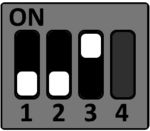
S6
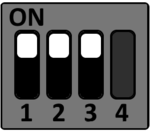
S7
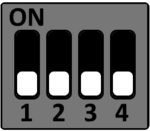
S8
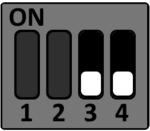
S10

STKLS1046A
SD-Card RCW 3333_5559 (Default RCW)
S5
S6
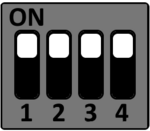
S7
S8
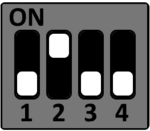
S10
Boot Device Selection (S5)
To select the desired boot medium set the DIP switches accordingly
SD-Card
S5
eMMC
S5
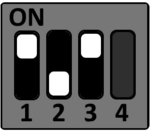
QSPI NOR
S5
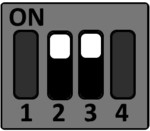
MBLS10xxA Configuration DIP (S6,S7,S8,S10)
S6
| DIP | ON | OFF |
|---|---|---|
| 1 | SerDes1 Lane A - SGMII | SerDes1 Lane A - QSGMII |
| 2 | SerDes1 Lane B - SGMII | SerDes1 Lane B - QSGMII |
| 3 | SerDes1 Lane D - SGMII | SerDes1 Lane D - XFI2 |
| 4 | SerDes2 Lane B - MPCIe | SerDes2 Lane B - SGMII |
S7
| DIP | Function | ON | OFF |
|---|---|---|---|
| 1 | QSGMII1 CLK SEL | 156.25 MHz | 125 MHz |
| 2 | QSGMII PHY1 CONFIG | QSGMII to Copper | SGMII to Copper |
| 3 | QSGMII2 CLK SEL | 156.25 MHz | 125 MHz |
| 4 | QSGMII PHY2 CONFIG | QSGMII to Copper | SGMII to Copper |
S8
| DIP | Function | ON | OFF |
|---|---|---|---|
| 1 | SerDes2 Lane D | PCIe | MPCIE/SATA |
| 2 | SerDes2 Lane D | SATA | MPCIE |
| 3 | Demuxing | turn off | turn on |
| 4 | SerDes1 REF CLK2 | 156.25 MHz | 125 MHz |
S10
| DIP | ON | OFF |
|---|---|---|
| 1 | DVDD=3.3V | DVDD=1.8V |
| 2 | EVDD=3.3V | EVDD=1.8V |