MBa8MPxL DIP switch settings
Boot Devices
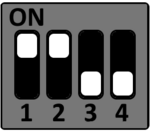
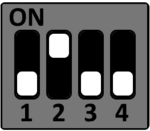
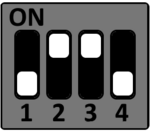
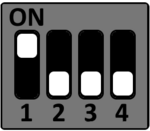
The following boot modes of the i.MX8MP can be selected by the DIP switch S1 on the MBa8MPxL.
SD-Card
S1
eMMC
S1
QSPI NOR
S1
Serial Downloader
S1
Functional DIP Switches
DIP switch settings for boot and CAN.
Boot Configuration (S1)
DIP switch S1 is used to configure the BOOT_MODE Pins.
| DIP | Signal Name | OFF | ON |
|---|---|---|---|
| S1-1 | BOOT_MODE0 | LOW | HIGH |
| S1-2 | BOOT_MODE1 | LOW | HIGH |
| S1-3 | BOOT_MODE2 | LOW | HIGH |
| S1-4 | BOOT_MODE3 | LOW | HIGH |
CAN0 configuration (S12)
DIP switch S12 is used to configure the CAN interface CAN0.
| Funktion | S12-1 | S12-2 |
|---|---|---|
| CAN-Bus not terminated | OFF | OFF |
| not defined (illegal state) | OFF | ON |
| not defined (illegal state) | ON | OFF |
| CAN-Bus terminated with 120 Ohm | ON | ON |
CAN1 configuration (S11)
DIP switch S11 is used to configure the CAN interface CAN1.
| Funktion | S11-1 | S11-2 |
|---|---|---|
| CAN-Bus not terminated | OFF | OFF |
| not defined (illegal state) | OFF | ON |
| not defined (illegal state) | ON | OFF |
| CAN-Bus terminated with 120 Ohm | ON | ON |