Embedded module TQMa117xL
Prerequisites
- Segger J-Link Debug Probe
- Demo Artefacts built according to the Building a Demo Guide
- An NXP Account for the MCUXpresso Secure Provisioning Tool (v.26.03)
Preface
Download and install NXPs Secure Provisioning Tool. An NXP Account is necessary to download the Software.
Build the Demo according to the Guide. Use the build configurations flexspi_nor_debug or flexspi_nor_release. The resulting artefact will be adjusted and flashed to SPI-NOR of TQMa117xL.
Flash to SPI-NOR on TQMa117xL
- Use the following DIP switch configuration to put the board into serial downloader mode.
Serial Downloader
S3
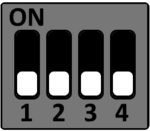
S4
S5
S6
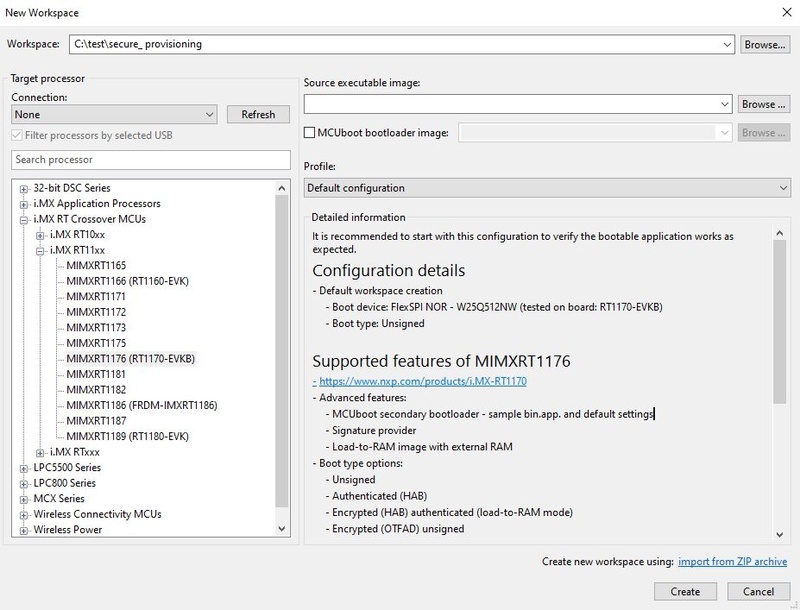
- Open the Secure Provisioning Tool and create a new workspace. Select a location and choose the correct processor (e.g. MIMXRT1176 (RT1170-EVKB)), then click “create”.
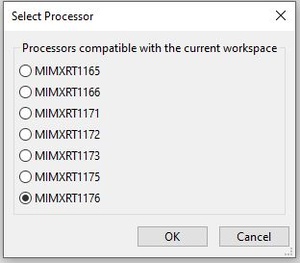
- Select the processor menu in the top left corner.

- Pick the correct processor.
- Select the programming interface menu.

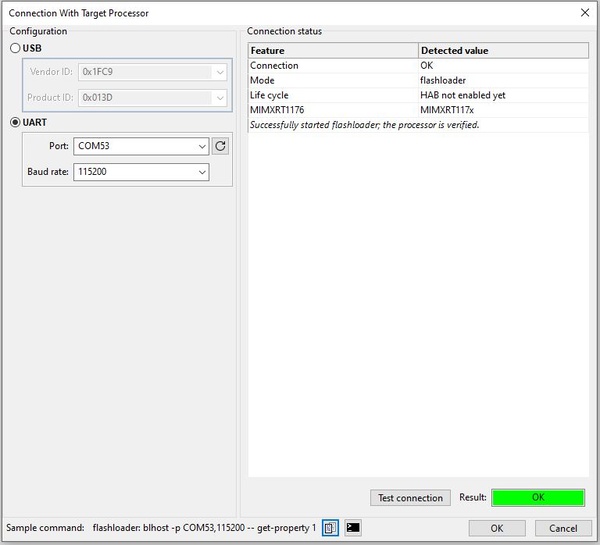
- Pick UART as connection type and set the COM port to the one that is used for the target hardware connection. Set the baud rate to 115200. Check the connection with the “Test Connection” button afterwards.
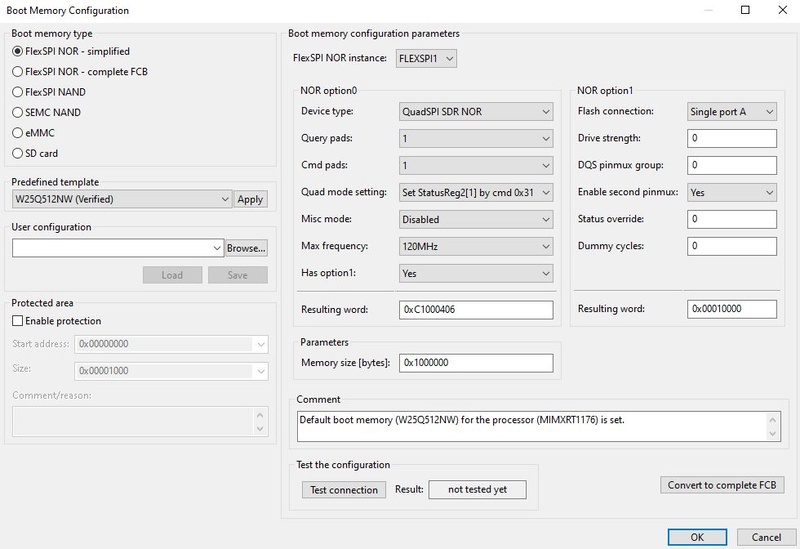
- Go into the boot memory configuration.

- Configure the parameters like the following.
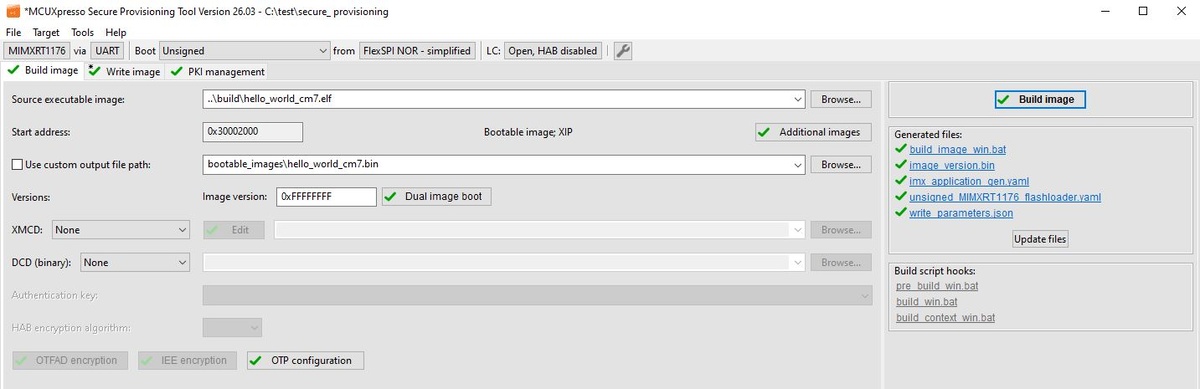
- Swap to the “Build image” tab and select the
hello_world_cm7.elf, then click “Build Image”.
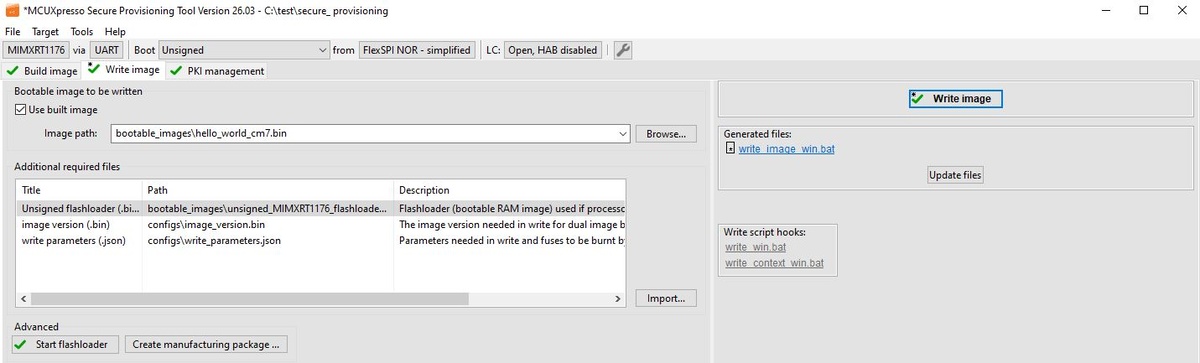
- Swap to the “Write image” tab. The correct image (./bootable_images/hello_world_cm7.bin) should be selected already. Click “Write Image”.
- Open a serial terminal, select the COM Port of the target and a baud rate of 115200.
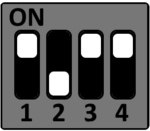
- Power off the board and select the SPI boot mode using the following DIP switch configuration:
SPI Boot
S3
S4
S5
S6
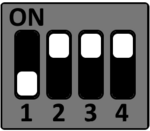
- When powering on the board now, the serial terminal should print a “hello world” message.
Prerequisites
- Segger J-Link Debug Probe
- Windows 10/11 or Ubuntu 22.04 and above
Prepare Host System
Set up Workspace
Go to the root workspace directory and then clone the repository:
git clone https://github.com/tq-systems/mcuxsdk-examples-tq.git
Install necessary dependencies for the SDK:
pip install ninja jsonschema cmake west
pip install -r mcuxsdk-examples-tq/scripts/requirements.txt
Initialize the workspace
west init --local mcuxsdk-examples-tq
west update
Note: If the installed commands (e.g. west) are not recognized, their installation directory needs to be added to the PATH environment variable.
For Windows, add the following to the system environment:
C:/Users/<Username>/AppData/Roaming/Python/Python3x/Scripts

For Linux, execute:
export PATH=$PATH:$HOME/.local/bin
Compile the Application
Remove old builds if necessary
Available example applications for TQMa117xL:
Build the Example:
west build -b tqma117xl-mba117xl mcuxsdk-examples-tq/_boards/tqma117xl-mba117xl/examples/<application_path>/ -Dcore_id=cm7 -DCUSTOM_BOARD_ROOT="mcuxsdk-examples-tq/_boards" --config=debug
#e.g. for the hello world demo
west build -b tqma117xl-mba117xl mcuxsdk-examples-tq/_boards/tqma117xl-mba117xl/examples/demo_apps/hello_world/ -Dcore_id=cm7 -DCUSTOM_BOARD_ROOT="mcuxsdk-examples-tq/_boards" --config=debug
The final build is located in build/<application_name>.elf.
Run and Debug the Demo
The applications can also be debugged via VS Code or GDB-Server.
Run the Demo using VS Code
Configure VS Code Settings
Open the workspace in VS Code and create a folder .vscode in the workspace root.
Create a settings.json with the following content and modify the installation paths.
{
    "cortex-debug.gdbPath": "<arm-none-eabi-gdb.exe path>",
    "cortex-debug.armToolchainPath": "<arm-none-eabi-gcc.exe path>",
    "cortex-debug.JLinkGDBServerPath": "<JLinkGDBServerCL.exe path>",
    "cortex-debug.variableUseNaturalFormat": true,
}
Note: The content can also be copied from /mcuxsdk-examples-tq/templates/settings.json
Create a launch.json with the following content and change the device specification if necessary:
{
    "configurations": [
        {
            "showDevDebugOutput": "both",
            "type": "cortex-debug",
            "request": "launch",
            "name": "Load into ram",
            "cwd": "${workspaceFolder}",
            "executable": "${workspaceFolder}/build/<application_name>_cm7.elf",
            "servertype": "jlink",
            "device": "MIMXRT1176xxxA_M7",
            "runToEntryPoint": "main",
            "interface": "jtag",
            "serverArgs": [
                "-endian",
                "little",
                "-LocalhostOnly",
                "-speed",
                "4000"
            ],
            "postLaunchCommands": [
                "target remote localhost:50000",
                "monitor reset",
                "monitor halt",
                "load"
            ]
        }
    ]
}
Note: The content can also be copied from /mcusdk-examples-tq/_boards/tqma117xl-mba117xl/templates/launch.json
Boot the Board
Set the Board to Serial downloader mode:
Serial Downloader
S6
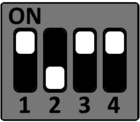
The DIP-Switches S3-S5 can all be turned off. Connect the Starterkit to the host as described in the STKa117xL Quickstart Guide and open two new serial terminals with the first and second virtual serial interfaces. The first interface will print serial output from the board's Linux and the second interface will receive the serial output from Cortex M7. Connect the Segger J-Link Debug Probe to X48.
Run the Demo
In VS Code, swap to the Run and Debug section on the left side and choose “Load into ram” from the dropdown menu. Then, click the green PLAY button (or press F5).
The program will be loaded onto the board and will start the main function. The demo's output should be printed in the Cortex-M7 terminal.
Run and Debug the Demo using GDBServer
Boot the Board
Set the Board to Serial downloader mode:
Serial Downloader
S6
The DIP-Switches S3-S5 can all be turned off. Connect the Starterkit to the host as described in the STKa117xL Quickstart Guide and open two new serial terminals with the first and second virtual serial interfaces. The first interface will print serial output from the board's Linux and the second interface will receive the serial output from Cortex M7. Connect the Segger J-Link Debug Probe to X48.
Open the Debugserver
Open a terminal and start the J-Link GDB Server. Change the device specification (here: MIMXRT1176xxxA_M7) if necessary.
JLinkGDBServerCLExe -device MIMXRT1176xxxA_M7 -if JTAG -speed 4000 -port 50000
Note: On Windows, make sure that JLinkGDBServerCL.exe is available via the PATH environment variable or use the full path to the executable.
Run the Demo
Open a second terminal and start GDB.
# Windows
& '.\Program Files (x86)\Arm\GNU Toolchain 15.2 mingw-w64-i686-arm-none-eabi\bin\arm-none-eabi-gdb.exe'

# Linux
/opt/arm-gnu-toolchain-15.2.rel1-x86_64-arm-none-eabi/bin/arm-none-eabi-gdb
With GDB, execute the following to start debugging the demo
file <PATH.elf>
target remote localhost:50000
monitor reset
monitor halt
load
monitor go
The demo's output should be printed in the Cortex-M7 terminal.