TQMa7x - YOCTO Linux BSP documentation
GPIO-Buttons
The MBa7x features three user buttons which are handled by the gpio-keys driver.
GPIO Button Overview
| Reference | Button |
|---|---|
| S11 | KEY_1 |
| S12 | KEY_2 |
| S13 | KEY_3 |
GPIO Button Location
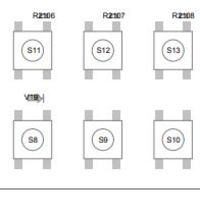
The buttons are accessible via the input device interface. You can identify the correct event node and test the buttons using the evtest tool:
evtest
Select the number corresponding to the “gpio-keys” device. Alternatively, if the event node is known (e.g. /dev/input/event1), you can run it directly:
evtest /dev/input/event1